Cursor Projects UI and UX
Cursor Projects UI and UX
Section titled “Cursor Projects UI and UX”Summary for DIY dashboard designers
Section titled “Summary for DIY dashboard designers”Cursor’s product surface for long-lived fleet work is Projects inside the Agents Window left nav: you chat with a named coordinator that does not write code; it plans, spawns/manages coding agents, and brings finished work back for you to check. Workers are first-class list items you can open to follow or talk to. Status and progress are mostly chat- and list-adjacent (activity phrases, file/diff counts, Listening pill, run/agent lifecycle via API) rather than a separate ops console. Output is a bundle of conversation + diffs/PR review + artifacts (screenshots/videos/logs) + optional remote desktop control—observe and steer on the vendor product. Automations and per-conversation Subscriptions are the “listening” surfaces. Web (cursor.com/agents), desktop Agents Window, and iOS share the same agent backend; admin/env/secrets stay on the dashboard.
Locked DIY Web UI v0 (framing): local dashboard = project list → run list → live xterm observe for selected pane; status from Herdr on view; no web steer; no personal-site pulse. Steal hierarchy + naming + status-on-detail; skip control, Listening, shared-context product, and PR/desktop theater for v0.
Confidence: High on coordinator naming, create flow, Listening pill, Agents Window vs editor vs web/mobile split, and Cloud Agent output surfaces (diffs/artifacts/desktop). Medium on exact visual chrome (colors, icons, sidebar badges)—official docs describe behavior more than pixel layouts; marketing pages show illustrative list rows. Low on undocumented screenshot-only nuances (hover states, exact status chip colors for Projects).
1. Coordinator vs workers (naming in UI)
Section titled “1. Coordinator vs workers (naming in UI)”| Role | Product name | What the UI implies |
|---|---|---|
| Control plane | Coordinator / coordinator agent | Chat partner for the Project. Docs: does not write code; plans, creates/manages agents, brings finished work back to you to check. Stays responsive because it delegates rather than executes. |
| Workers | Agents (also “subagents” / coding agents in blog copy) | Created by the coordinator; run in parallel as needed. Open any agent the coordinator starts to follow its work or talk to it directly. |
| Runtime | Cloud Agents (default); local agent when needed | Project “runs on its own computer in the cloud”; coordinator can spin a local agent for on-machine testing. |
| Container | Project | Durable work unit; lives in Projects section of Agents Window left-hand nav. |
Create naming (docs): New Project → choose icon + project name (default “New Project” if empty) → Workspace (cloud-connected repo; “Connect GitHub” if needed) → Model (coordinator model) → Create Project → opens as a chat with its coordinator.
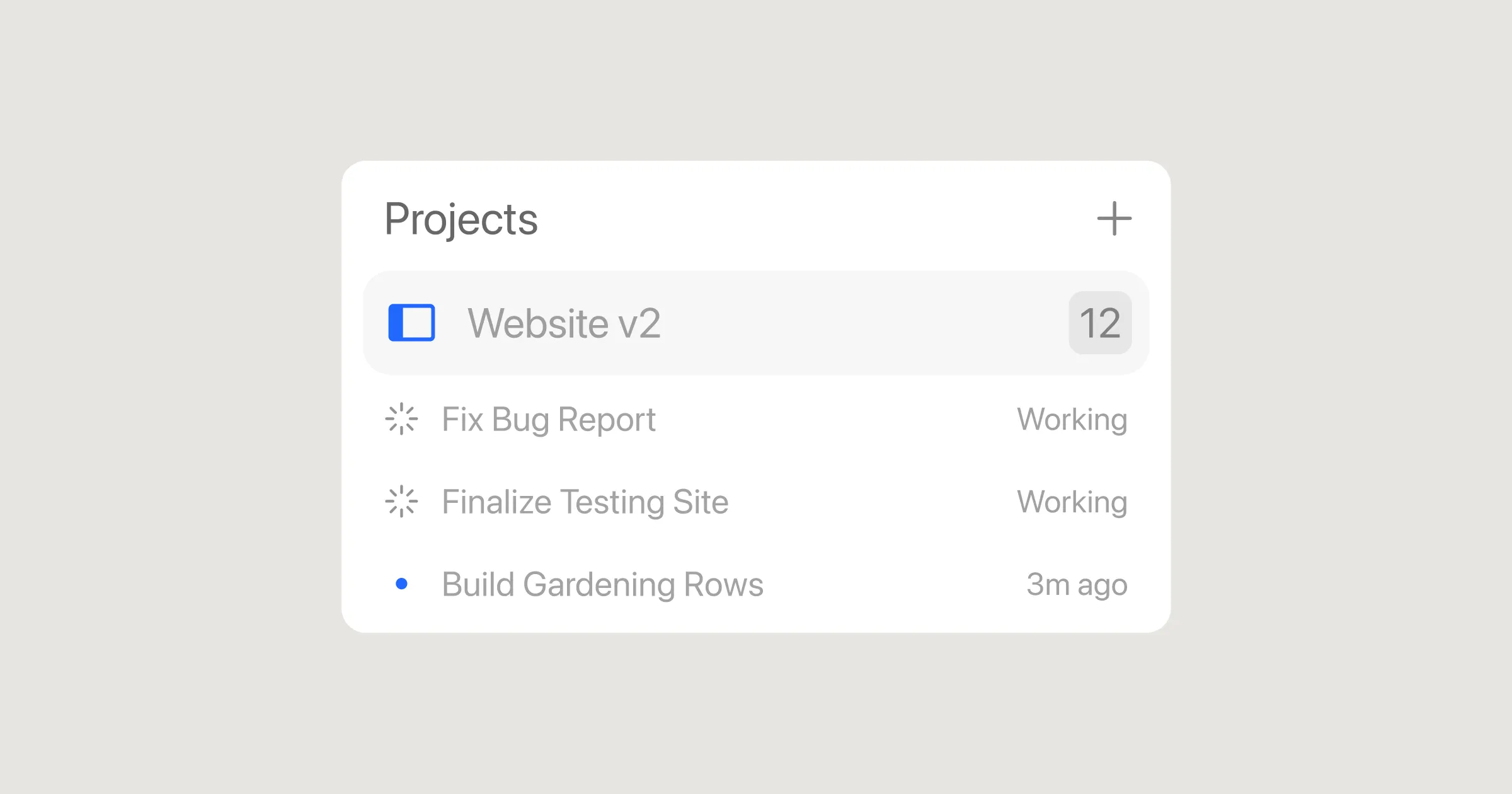 Projects left-nav list (icon + name, Working / relative-time status). Source: blog OG —
 assets/blog/og/projects-og-4-…png.
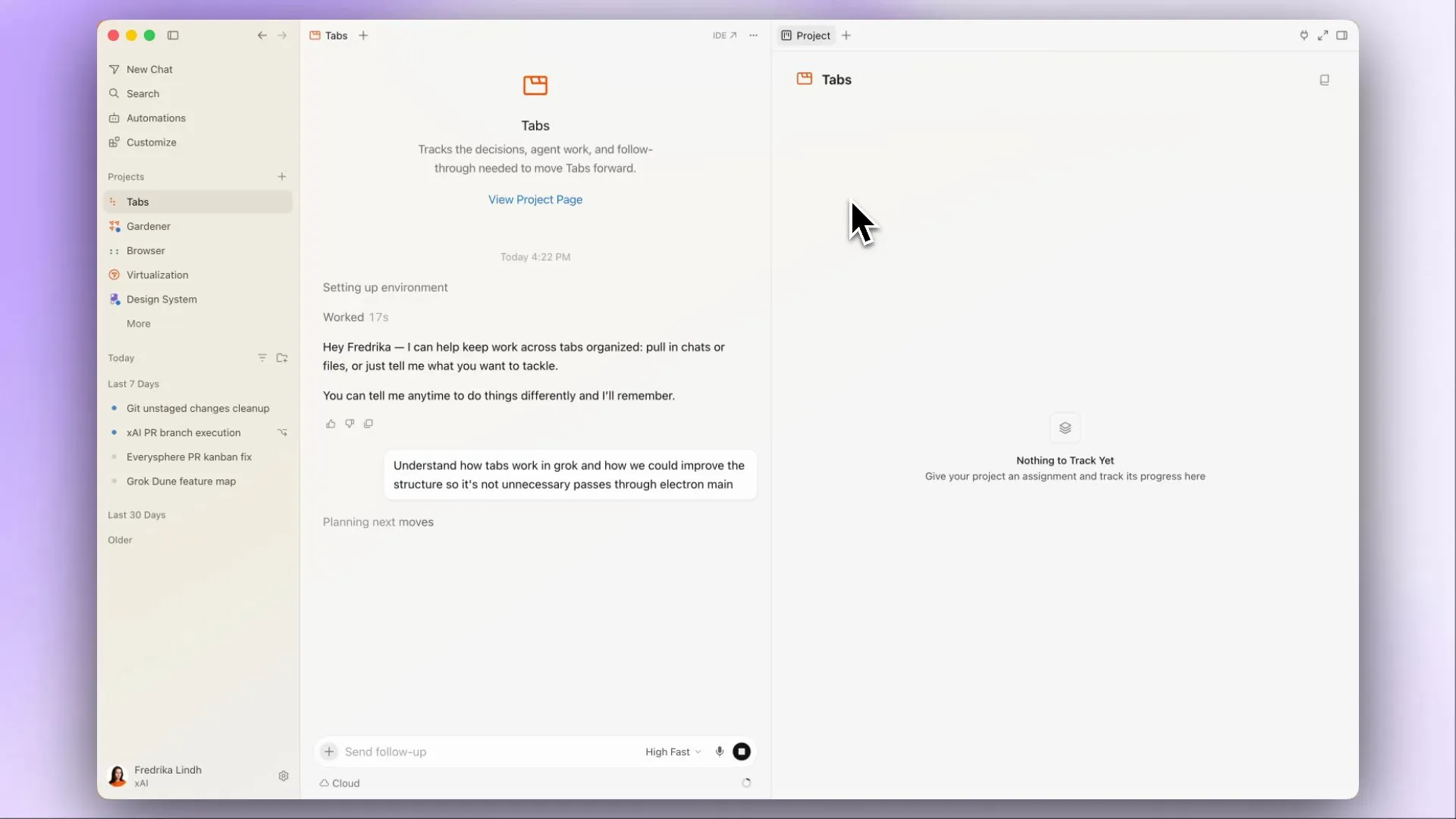 Agents Window with Projects section (Gardener / Browser / …), coordinator chat for selected Project, empty Project track pane. Source: frame from changelog/projects Mux demo.
Sources: Projects docs (primary), blog 2026-09-10, changelog. Prior vault: 2026-09-25 Cursor Project and pstack.
Steal: Explicit coordinator vs run/worker labels; selecting a worker opens its detail (observe) without forcing all I/O through the coordinator chat alone.
2. Navigation hierarchy (browse)
Section titled “2. Navigation hierarchy (browse)”Documented hierarchy for Projects:
Agents Window└── Left nav → Projects section └── Project (icon + name) ├── Coordinator chat (default detail) └── Agents started by coordinator (openable)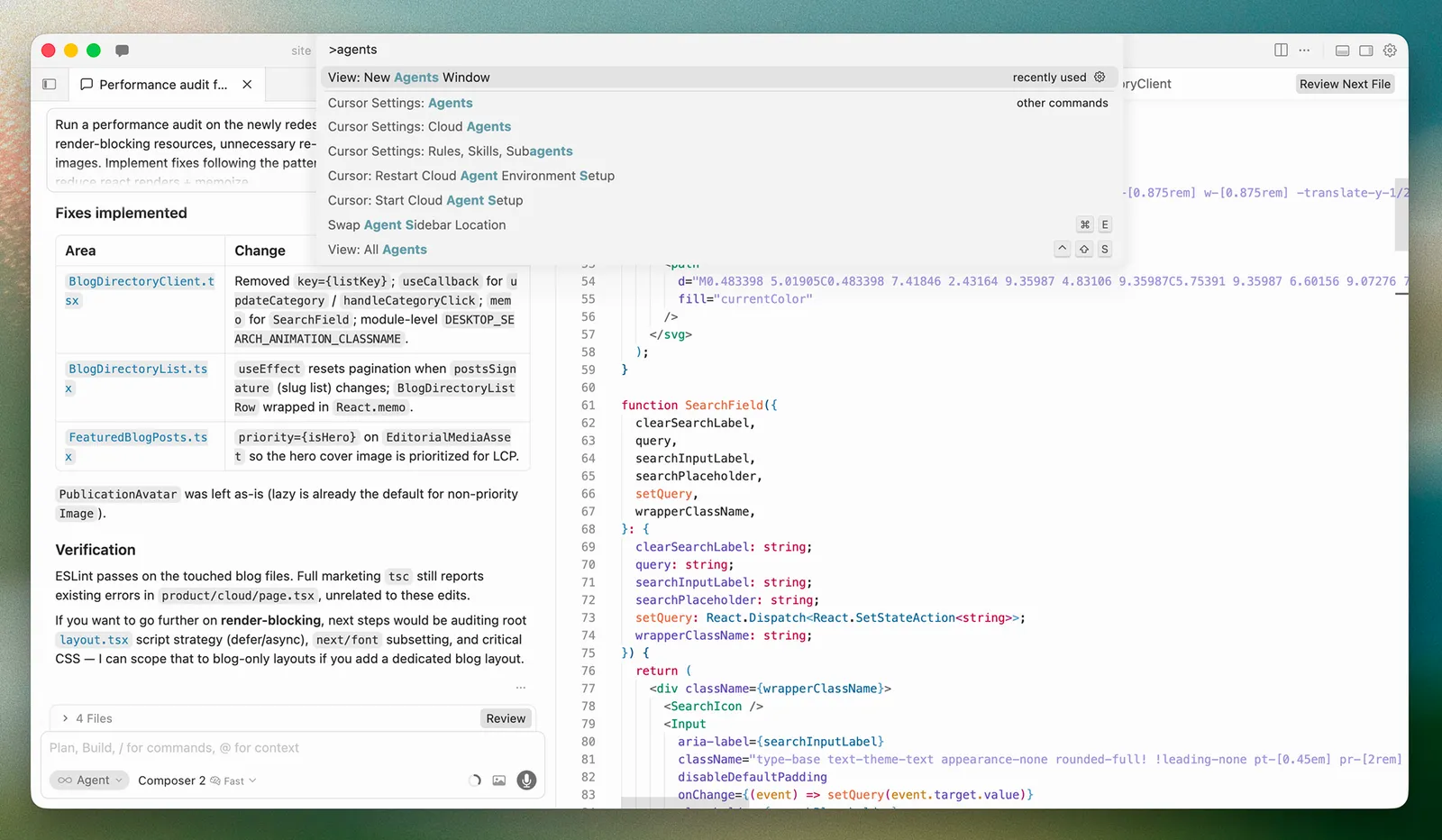 Command Palette → View: New Agents Window (entry from Editor). Source: Agents Window docs (
docs-static/images/agent/open-agents-window-final.png).
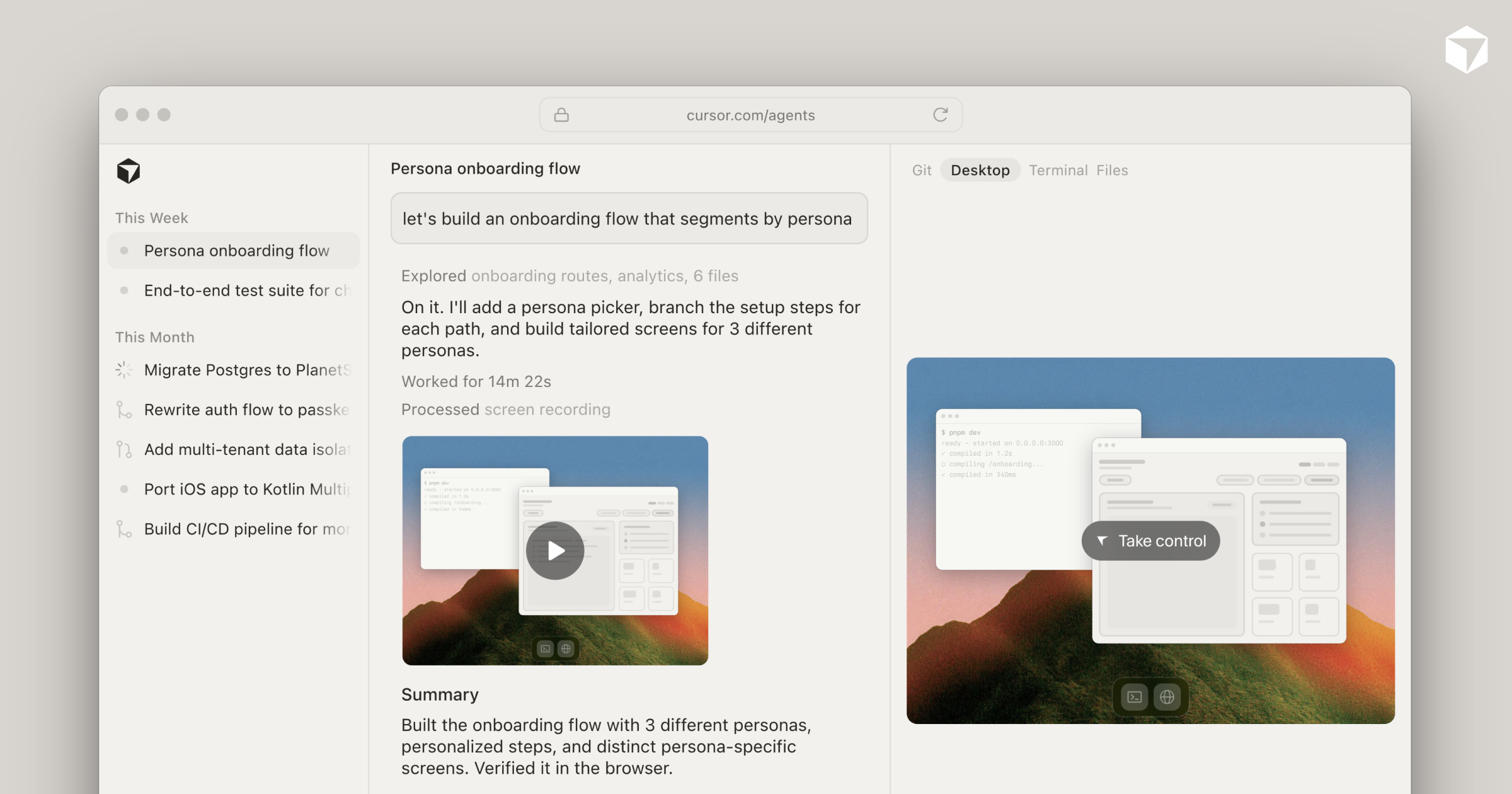
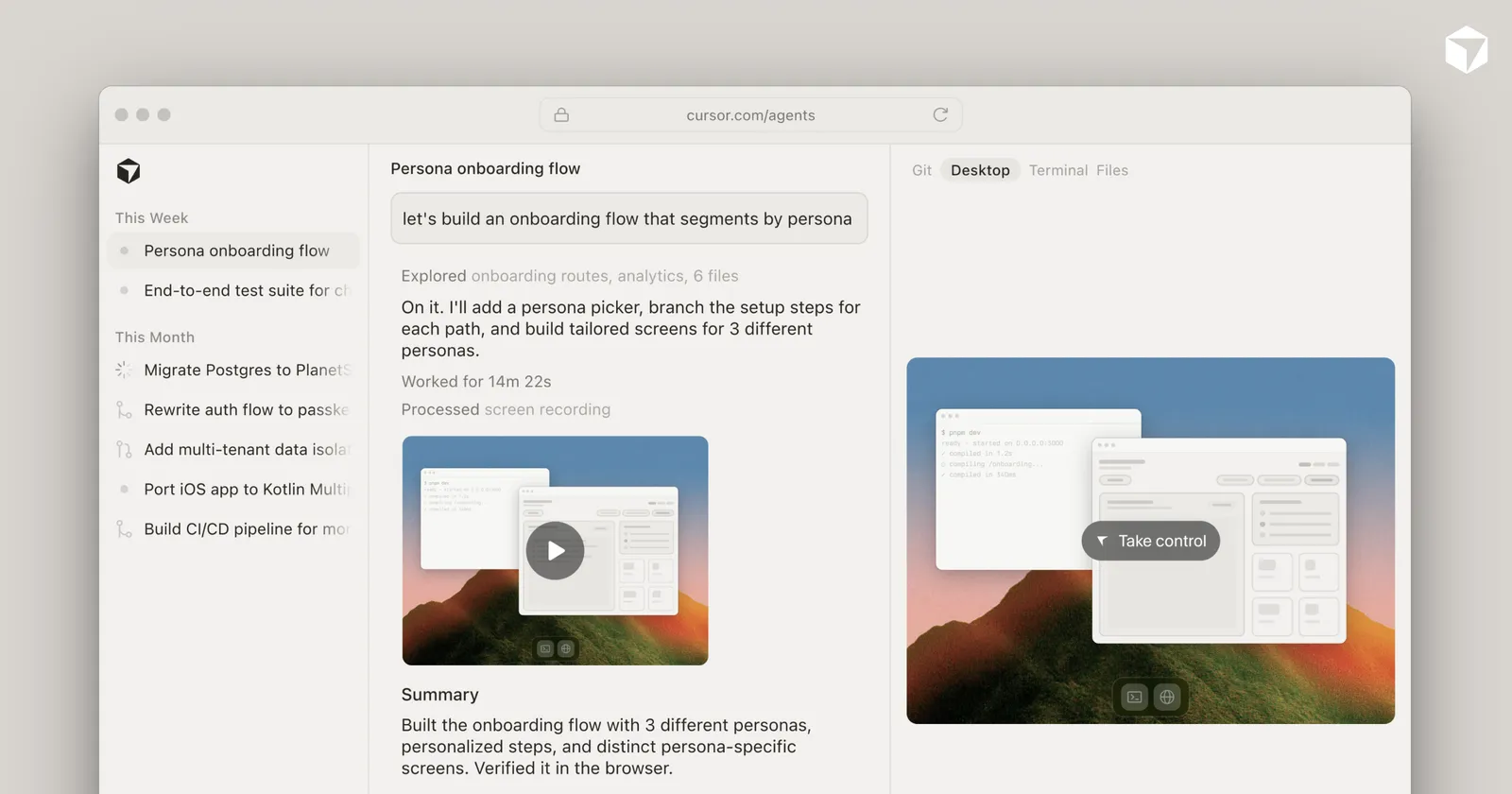 Web Agent Dashboard (
cursor.com/agents): time-grouped list, conversation + artifact preview, Git / Desktop / Terminal / Files, Take control. Source: cursor.com/cloud OG (assets/features/cloud-og-image.png).
Adjacent (not Projects-specific, but same Agents Window mental model):
Agents Window left sidebar├── Workspaces / projects (folder or org/repo labels)│ └── Chats / agents (each chat tied to one project)├── Cloud / local / worktree / SSH agents (unified list)└── Automations (also on cursor.com/automations)Web Agent Dashboard (cursor.com/agents — marketing UI copy): list grouped by time (Today / This Week); each row shows a task title, a short activity phrase (e.g. “Analyzing codebase”, “Planning next moves”), optional N Files +X−Y, and a repo/env label. Detail: conversation + review chrome (Review, Commit & Push, tabs like Git / Desktop / Terminal / Files).
API mental model (useful for DIY mapping, even if not the Projects UI itself): durable agent (bc-…) + per-prompt runs; agent URL https://cursor.com/agents/{id}. Agent statuses ACTIVE | IDLE | ARCHIVED; run statuses include CREATING | RUNNING | FINISHED | ERROR | CANCELLED | EXPIRED.
Sources: Projects, Agents Window, cursor.com/cloud (illustrative list UI), Cloud Agents API, forum clarifications on sidebar project sections (community, not primary).
Documented vs inferred: Exact sidebar nesting of “Project → child agent rows” is described in prose (“open any agent”), not as a wireframe. Time-grouped Agent Dashboard rows are from marketing demos—treat as product intent, not a guaranteed pixel match to Production.
3. Status & progress surfaces
Section titled “3. Status & progress surfaces”| Surface | What docs/marketing say | Notes for DIY |
|---|---|---|
| Coordinator chat | Ongoing plan/delegate dialogue; “brings finished work back to check” | Progress = conversation + opened child agents |
| Listening pill | Appears above the chat input once the Project has ≥1 subscription; click → list of events listened for; remove from same list | Clear “this Project is watching” affordance |
| Child agents | Open to follow work | Status is per-agent, not only on Project root |
| Cloud run dashboard events | setup_started / setup_completed / setup_failed, pr_created / pr_creation_failed, artifact_created, mcp_auth_error | Event kinds from Cursor Cloud MCP docs—ops timeline, not Projects-only |
| List activity phrases | “Analyzing codebase”, “Planning next moves”, “Worked for Nm Ns”, file diff counts | Marketing; good pattern for run-list subtitles |
| API agent status | ACTIVE (turn running / waiting / about to start), IDLE (follow-ups OK; machine may hibernate), ARCHIVED | Machine-lifecycle oriented |
| API run status | CREATING → RUNNING → terminal (FINISHED / ERROR / CANCELLED / EXPIRED) | Map loosely to Herdr working / done / etc. |
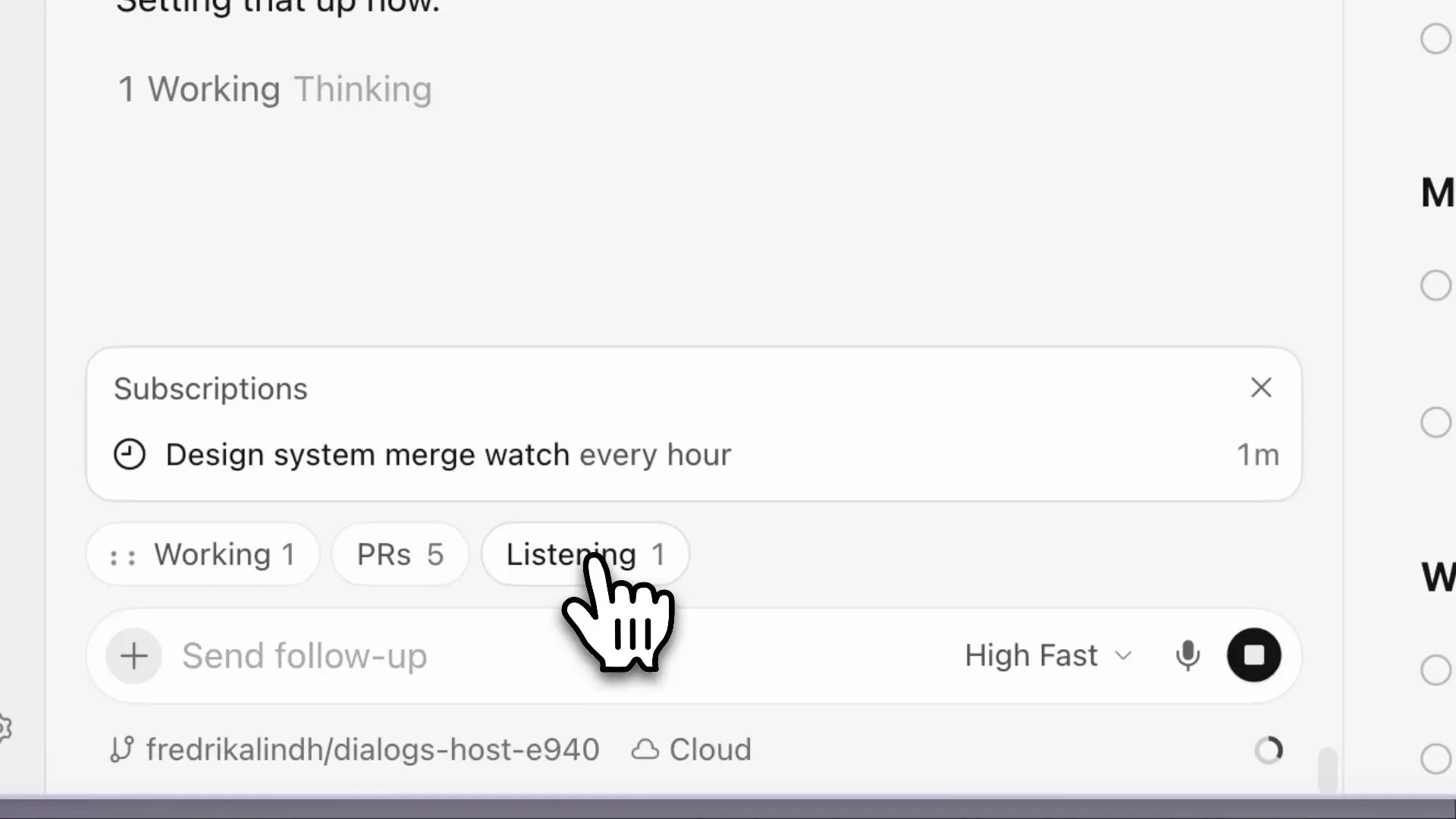
- Listening pill (+ Working / PRs chips) above chat input; expanded Subscriptions list (e.g. hourly merge watch). Source: frame from changelog/projects Mux demo.*
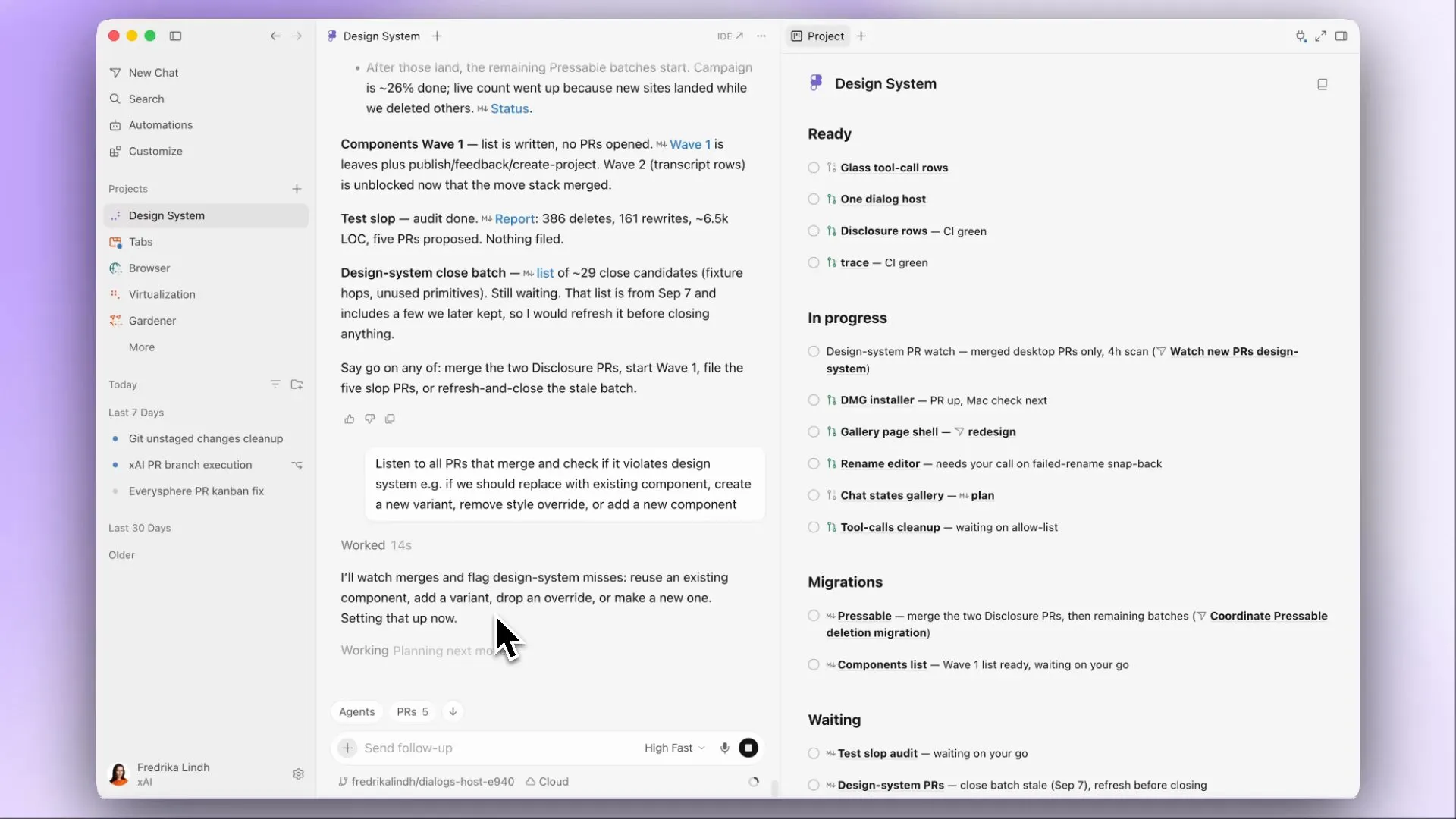 Coordinator chat + Project track board (Ready / In progress / Migrations / Waiting) with PR-watch subscription prompt. Source: same Mux demo.
Not found in official docs: Dedicated color legend (green/red chips) for Projects sidebar; explicit “waiting on CI” badge copy beyond subscription/Listening and Cloud Agent CI subscriptions.
Herdr v0 already locks live status from Herdr on view (idle / working / blocked / done / unknown) with no SQLite status cache—aligned with Cursor’s “status lives on the live agent/run, not a stale list store” API story.
4. Output / terminal / PR views (observe vs control)
Section titled “4. Output / terminal / PR views (observe vs control)”What you see (Cloud Agents + Agents Window)
Section titled “What you see (Cloud Agents + Agents Window)”- Conversation / chat stream — primary narrative of the run.
- Diffs / Review — Agents Window “new diffs view”: review, stage/unstage/revert, commit, manage PRs without leaving Cursor. Marketing chrome: Review, +N −M, Commit & Push.
- Terminal / Files / Browser / Desktop — Agents Window and web agent pages expose terminal and related panels (docs + marketing + forum). Web attachment limits documented separately for
cursor.com/agents. - Artifacts — screenshots, videos, log references; often attached to PRs; optional posting into GitHub PR descriptions.
- Remote desktop — Take control of the agent’s VM desktop to test; release control back to the agent. This is control, not observe-only.
- PR handoff — merge-ready PRs; branch/
prUrlon API rungitsnapshot; Slack “Open in Cursor / Open in Web”. - Team share — agent URL: teammates see conversation, code changes, artifacts; viewing is read-only unless team follow-ups enabled.
- Subagents — mobile docs: tap a subagent card to read child transcript; background subagents also write under
~/.cursor/subagents/(local).
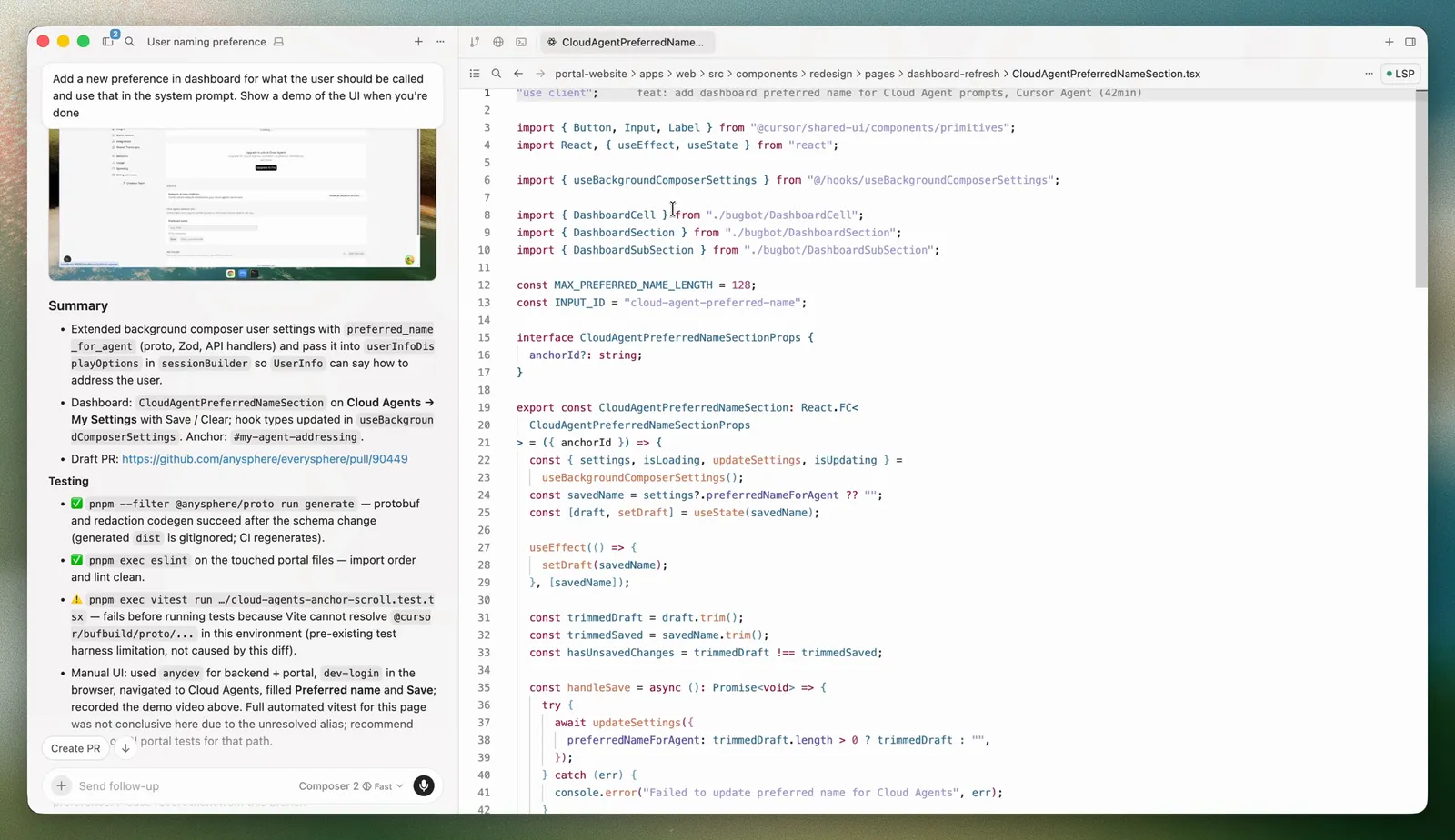 Agents Window: chat stream with embedded demo artifact, Summary / Testing, Create PR / follow-up; file open beside agent. Source: Agents Window docs (
file-agents-window-final.png).
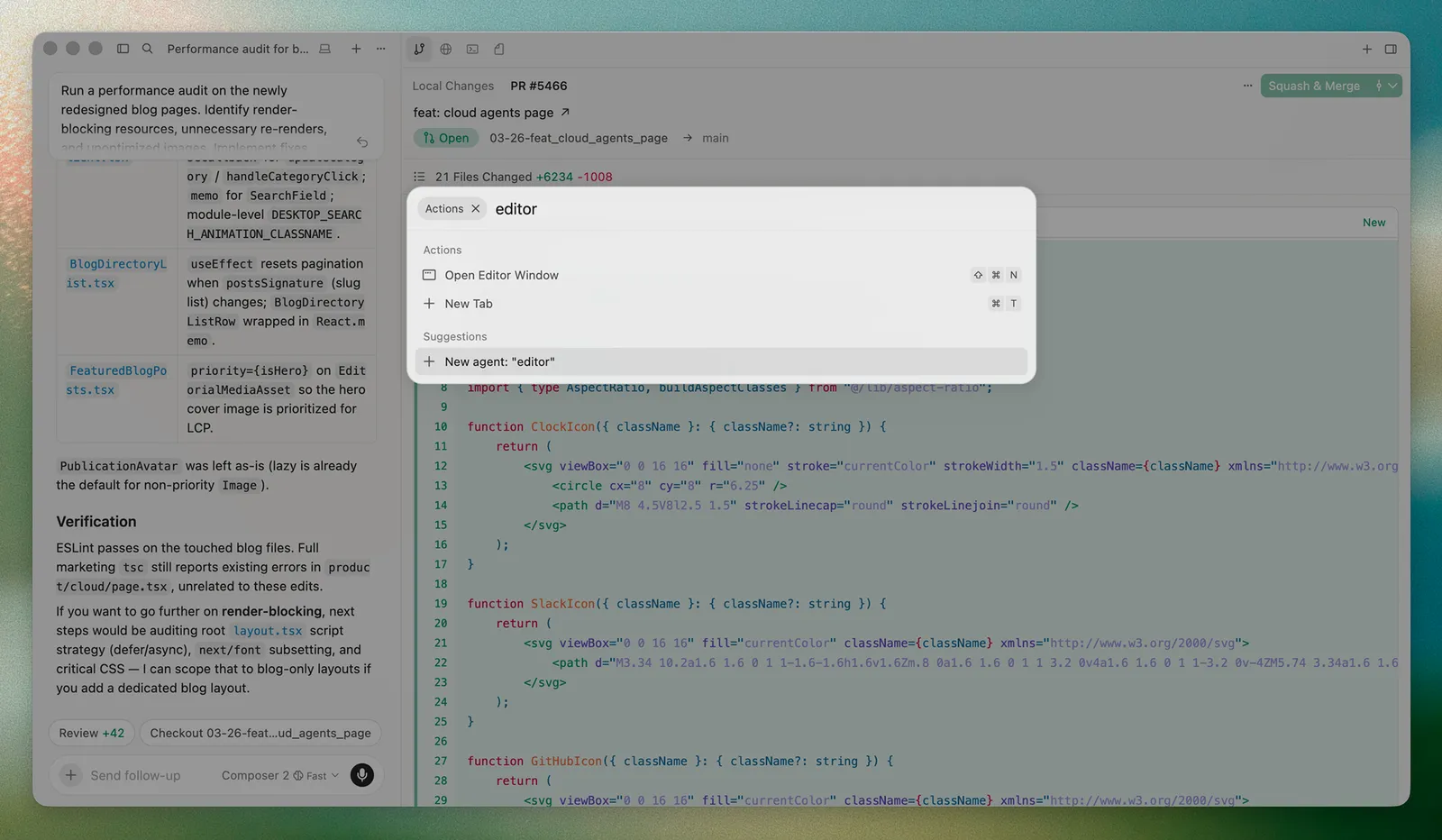 Diffs / PR review chrome in Agents Window (Review +N, Checkout, Squash & Merge) + Open Editor Window action. Source: Agents Window docs (
open-editor-window-final.png).
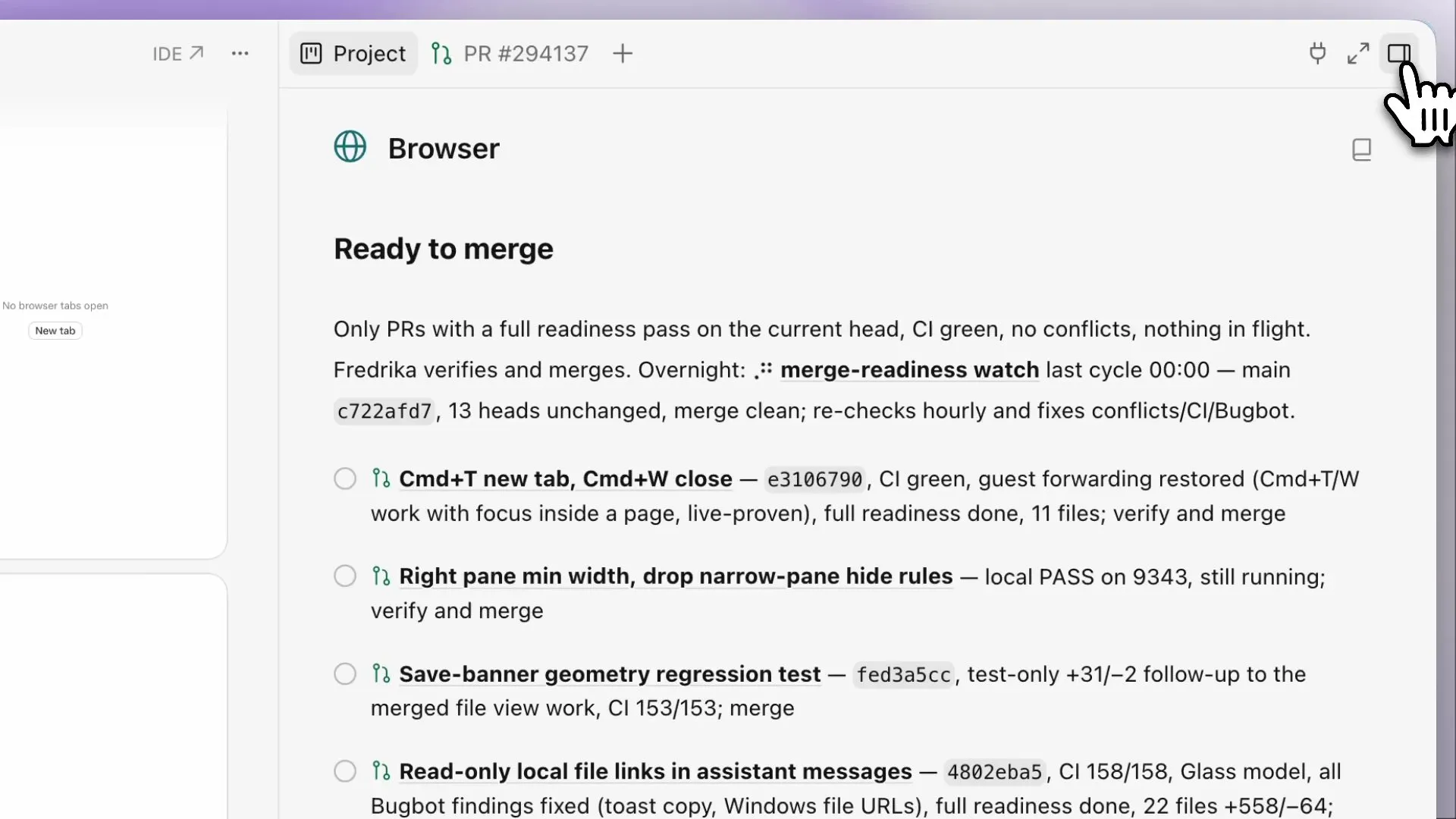 Project detail “Ready to merge” PR list (CI / Bugbot readiness) under Browser project tab. Source: changelog/projects Mux demo.
Observe vs control (vendor)
Section titled “Observe vs control (vendor)”| Action | Vendor product | DIY v0 lock |
|---|---|---|
| Watch chat / transcript | Yes | Optional later; not required for v0 |
| Live terminal | Yes (web + Agents Window) | Yes — xterm observe only via herdr observe |
| Send follow-up / prompt | Yes (web, IDE, mobile, Slack, …) | No web steer |
| Take remote desktop | Yes | Skip |
| Edit via diffs / commit / merge PR | Yes | Skip for v0 UI |
Sources: Cloud Agents, Capabilities, Agents Window, cursor.com/cloud, Cloud Agents help, Subagents, iOS.
5. Automations / listening surfaces
Section titled “5. Automations / listening surfaces”Three related “keep working without a new prompt” products—do not conflate in DIY naming:
A. Project Subscriptions + Listening pill (Projects-specific UX)
Section titled “A. Project Subscriptions + Listening pill (Projects-specific UX)”- Ask the coordinator to watch Slack, a schedule, or PRs/CI.
- Coordinator creates a subscription; Listening pill appears above chat input.
- Click pill → list events (channel message, PR activity, CI on a branch, cron like “every day at 8:00 AM”) → remove from same list.
- Example: Slack bug-report channel → delegate a fix each time.
B. Cloud Agent Subscriptions (per conversation)
Section titled “B. Cloud Agent Subscriptions (per conversation)”- Agent ends turn waiting on GitHub PR/CI, Slack thread/channel, Linear, or timers; wakes as follow-ups in the same conversation.
- Prompt framing or
/subscribe//loop. - Max duration 180 days; bursts coalesce.
C. Automations (always-on cloud agents)
Section titled “C. Automations (always-on cloud agents)”- Surfaces: Agents Window,
cursor.com/automations,/automateskill, Marketplace templates. - Triggers: schedule/cron, GitHub/GitLab/Bitbucket, Slack, Linear, Sentry, PagerDuty, webhooks.
- Config UI: triggers + instructions + tools (Slack, PR comment, MCP, memories, computer use) + repo / multi-repo / no repo.
- Cursor-managed agents listed on Automations page: Bugbot, Security Agents, PR Routing & Approval.
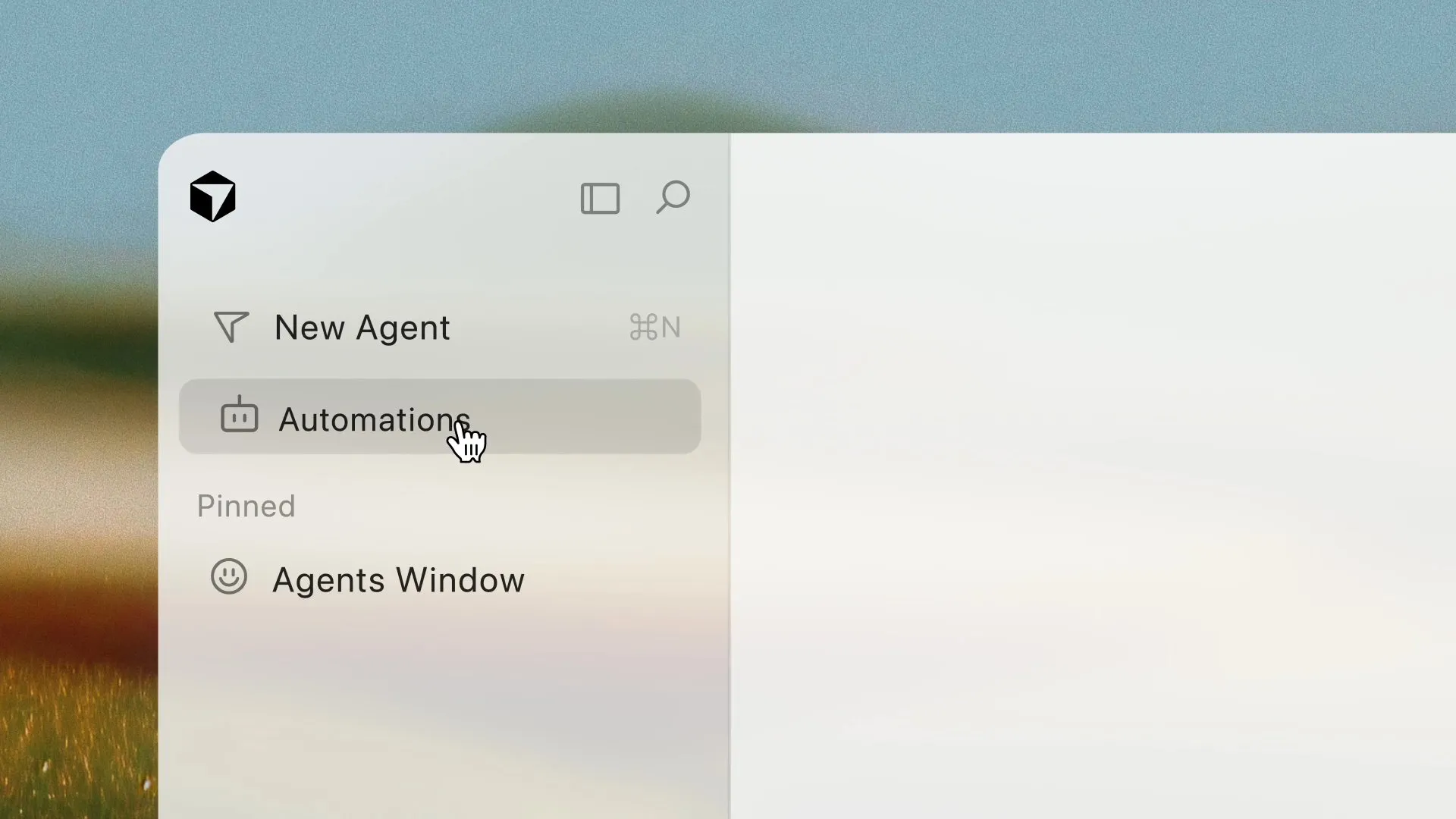 Agents Window sidebar: New Agent, Automations, pinned Agents Window. Source: frame from changelog 2026-05-20 Mux demo.
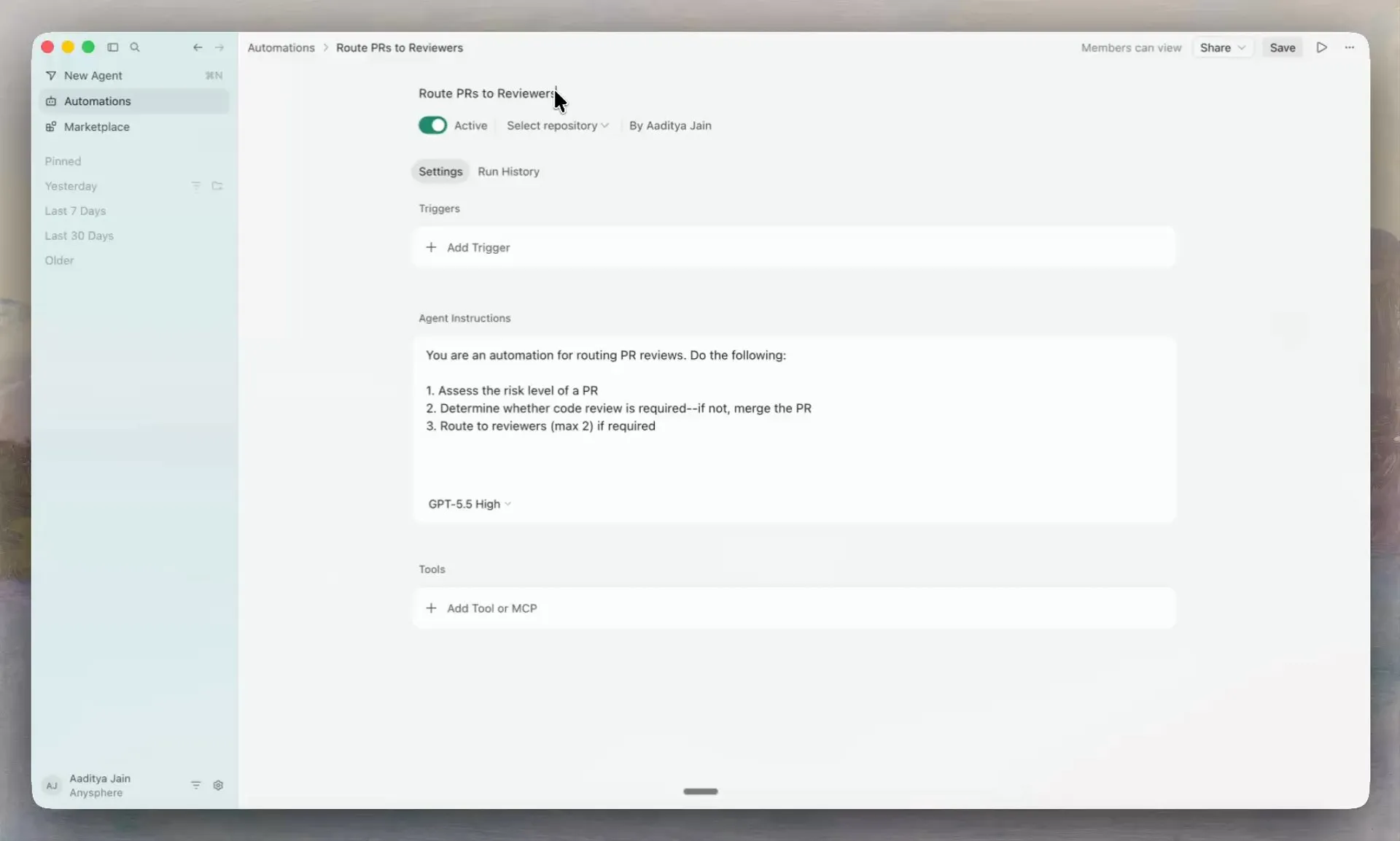 Automations config UI: Active toggle, repo picker, Triggers, Instructions, model, Tools/MCP (Route PRs to Reviewers). Source: same changelog Mux demo.
v0: all of the above are out of scope (no Listening UI, no Automations clone). Pattern worth remembering later: a single Listening / watching chip on the project detail that expands to an editable subscription list.
Sources: Projects — Subscriptions, Capabilities — Subscriptions, Automations, changelogs 2026-03-05, 2026-05-20.
6. Web vs IDE vs mobile split
Section titled “6. Web vs IDE vs mobile split”| Surface | Role | Projects / fleet notes |
|---|---|---|
| Agents Window (desktop) | Agent-first workspace; open via Cmd/Ctrl+Shift+P → Open Agents Window | Projects live here (left nav). Parallel agents, diffs, local↔cloud handoff, worktrees, /in-cloud, /autopilot, Automations. |
| Editor Window (classic IDE) | VS Code-style editing, extensions, splits | Switch via Open IDE / Open Editor Window; can run both. Cloud agent start: Cloud in dropdown under agent input. |
cursor.com/agents | Web start/manage Cloud Agents; MCP dropdown; attachments | Same backend as desktop/mobile agents list. Terminal/review on web. |
cursor.com/automations | Automations CRUD + templates | Also mirrored into Agents Window. |
cursor.com/dashboard/cloud-agents | Environments, secrets, builds, My Settings (e.g. autofix CI) | Admin/setup—not the day-to-day chat. |
| Cursor for iOS | Native inbox: start, follow live, review/merge PRs, Live Activities (up to 8), push on turn end | Same backend; not an IDE; no full terminal/file browser—diffs for changed files. Env/secrets/MCP admin/Automations config stay on web. |
| Android | Help: use cursor.com/agents in Chrome + Install App (PWA). iOS docs: native Android “planned.” | Web/PWA path today. |
| Slack / GitHub / Linear / … | Kick off + notifications (“Open in Cursor / Open in Web”) | Entry points into the same agent objects. |
Handoffs: Move to Cloud (conversation → cloud; dirty files not snapshotted); cloud ↔ local in Agents Window; iOS Remote Control (Agents Window setting) directs a computer-bound session from the phone while tools stay on the machine.
Web vs IDE visuals: see §2 (Command Palette → Agents Window; web Agent Dashboard) and §4 (PR/diff chrome). No public iOS/Android product screenshots on official docs/blog/changelog (mobile page is prose-only); mobile row left unillustrated.
Sources: Agents Window, Cloud Agents, Mobile / iOS, Help — Cloud Agents.
Patterns worth stealing for Herdr wrapper v0
Section titled “Patterns worth stealing for Herdr wrapper v0”Map to locked UI: project list → run list → live xterm observe; status from Herdr on view; no web steer; no personal-site pulse.
| Cursor pattern | Steal as | v0 fit |
|---|---|---|
| Left nav Projects list (icon + name) | Top-level project list (name; optional path) | Yes |
| Project detail defaults to coordinator; open workers | Project → run list; select run → detail | Yes (no coordinator chat required in v0) |
| Activity subtitle + file/diff counts on rows | Run row: Herdr status + short label (working, pane id) | Yes — status fetched on view, not SQLite |
| Dedicated detail pane for one agent’s stream | Live xterm for selected herdr_pane_id | Yes — observe bridge only |
| Clear coordinator vs worker naming | Optional later labels; even in v0, don’t call runs “projects” | Naming hygiene |
| Read-only teammate share of a run | Future; not v0 | Skip now |
| Listening pill | Future subscriptions UI | Skip v0 |
| Diffs / PR / Take control | Vendor depth | Skip v0 (no web steer / no desktop takeover) |
Concrete v0 layout suggestion (pattern-level, not a Cursor clone):
- Sidebar or page 1: projects (
name,created_at). - Drill-in: runs for
project_id(started_at, pane id). - Detail: header with live Herdr status + read-only xterm.js stream; no prompt box.
Patterns to skip (vendor lock-in / outside v0)
Section titled “Patterns to skip (vendor lock-in / outside v0)”- Remote desktop Take control / release — explicit control plane; contradicts observe-only bridge.
- Web prompt / follow-up / Slack-kickoff UX — steer stays CLI/TUI.
- Project shared context file sync — product feature; v0 SQLite has no
shared_context. - Listening / Automations / Marketplace templates / Bugbot — subscription products; out of v0.
- Full PR review page (checks, Code Tour, Bugbot inline, merge) — IDE/web depth.
- Move to Cloud / Remote Control / iOS Live Activities — multi-surface vendor mesh.
- Team share URLs + follow-ups — multiplayer.
- MCP dropdown on web agents, environment Build version history — cloud ops console.
- Cloning Agents Window chrome wholesale — lock-in + scope creep; steal hierarchy only.
Gaps (docs thin)
Section titled “Gaps (docs thin)”- No official annotated docs screenshot of Projects sidebar child-agent rows or status-chip legend; this digest uses marketing/changelog Mux frames + docs Agents Window shots instead (composites, not pixel-guaranteed Production).
- Exact status chip vocabulary in the Projects UI (vs API
ACTIVE/IDLEor Herdr states) is not enumerated for the coordinator list. - Whether Projects child agents appear as the same rows as standalone Cloud Agents in
cursor.com/agentsis implied (Cloud Agents powered) but not diagrammed. - Terminal parity bugs (Agents Window vs
cursor.com/agents) appear in community forum only—treat as unstable implementation detail, not design gospel. - This research did not use a logged-in Cursor account or live product screenshots; UI claims are limited to public docs/blog/changelog/marketing/help.
Sources
Section titled “Sources”Primary (official)
Section titled “Primary (official)”- https://cursor.com/docs/agent/projects — Projects UI: left nav, create flow, coordinator, Listening pill (fetched 2026-09-26)
- https://cursor.com/blog/projects — Introducing Projects (2026-09-10), Alexi Robbins & Fredrika Lindh
- https://cursor.com/changelog/projects — Changelog entry for Projects
- https://cursor.com/docs/agent/agents-window — Agents Window vs Editor; diffs; parallel agents
- https://cursor.com/docs/cloud-agent — Access surfaces (web, desktop, iOS, Slack, GitHub, Linear, API)
- https://cursor.com/docs/cloud-agent/capabilities — Artifacts, remote desktop, subscriptions, dashboard event kinds
- https://cursor.com/docs/cloud-agent/automations — Automations triggers/tools/settings
- https://cursor.com/docs/cloud-agent/api/endpoints — Agent/run status enums, stream events, artifacts
- https://cursor.com/docs/agent/subagents — Open/follow subagents;
/in-cloud,/autopilot - https://cursor.com/docs/cloud-agent/mobile — iOS inbox, Live Activities, web-only admin surfaces
- https://cursor.com/help/ai-features/cloud-agents — Picker, start paths, Android PWA note
- https://cursor.com/cloud — Marketing composites of Agent Dashboard list + Review/Terminal/Desktop
- https://cursor.com/changelog/03-05-26 — Automations launch
- https://cursor.com/changelog/05-20-26 — Automations in Agents Window; multi/no-repo
- 2026-09-25 Cursor Project and pstack — product definition; left-hand nav; Listening
- 2026-09-26 Cloud agent orchestrators in the wild — landscape; Projects vs Herdr
- 2026-09-26 Herdr for v0 cloud orchestrator — observe-only bridge; status from Herdr
- Cloud agent orchestrator — locked v0 Web UI
Images (official assets downloaded 2026-09-26)
Section titled “Images (official assets downloaded 2026-09-26)”cursor-projects-nav-list.png— https://ptht05hbb1ssoooe.public.blob.vercel-storage.com/assets/blog/og/projects-og-4-eYFsGoC01dE653MUPbfMcWZNX6eR8w.png (blog/projects)cursor-projects-agents-window.jpg,cursor-projects-coordinator-tracking.jpg,cursor-listening-pill-subscriptions.jpg,cursor-project-ready-to-merge.jpg— Mux frames from https://cursor.com/changelog/projectscursor-cloud-agents-web-dashboard.png— https://ptht05hbb1ssoooe.public.blob.vercel-storage.com/assets/features/cloud-og-image.png (cursor.com/cloud)cursor-agents-window-open-command.png,cursor-agents-window-open-editor.png,cursor-agents-window-file-search.png— https://cursor.com/docs-static/images/agent/… (Agents Window docs)cursor-automations-sidebar.jpg,cursor-automations-config.jpg— Mux frames from https://cursor.com/changelog/05-20-26